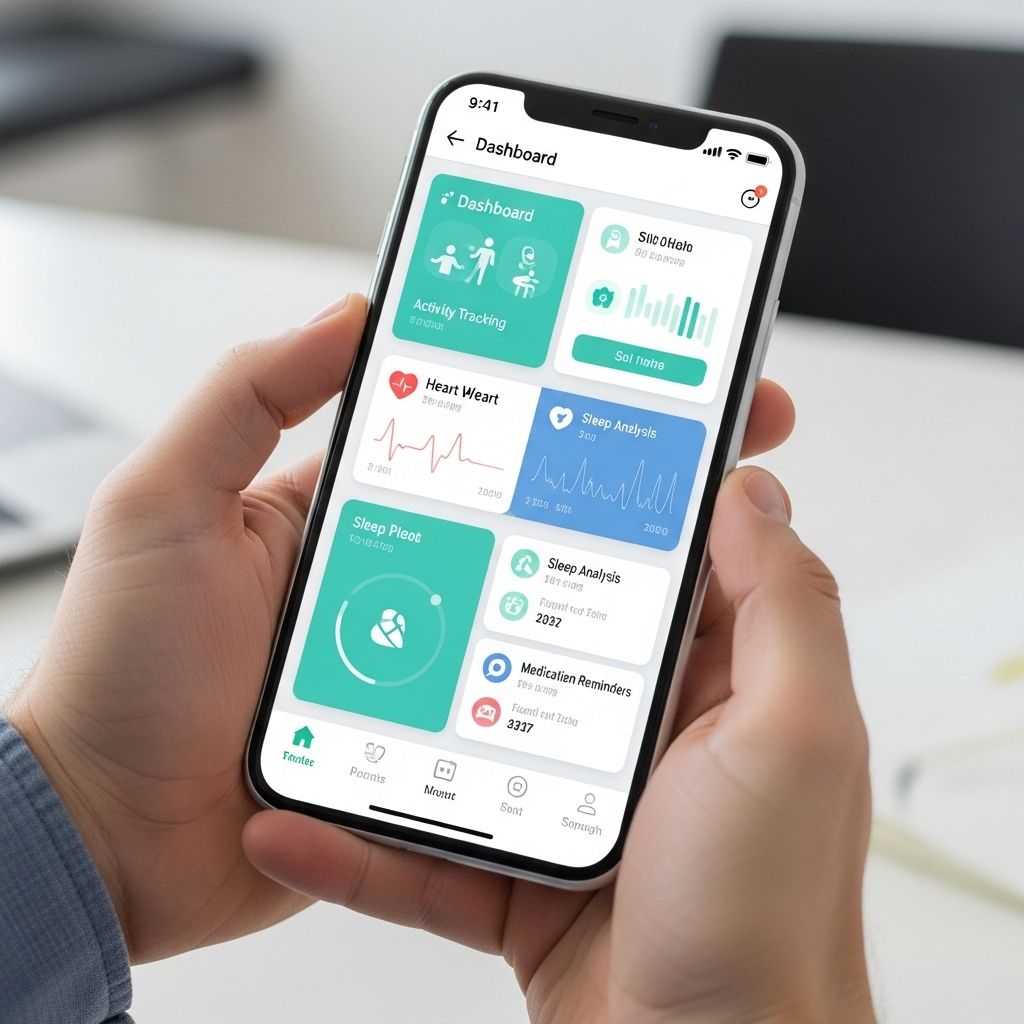
In the fast-evolving world of technology, building a health app prototype can be both an exhilarating and daunting task. With the increased demand for health solutions that enhance patient care and promote a healthier lifestyle, aspiring developers and entrepreneurs are eager to enter this booming market. In this article, we will guide you through the process of creating a health app prototype, focusing on essential steps, tools, and best practices to ensure your innovative idea comes to life.
Creating a health app prototype involves several key steps that guide you from initial concept to a tangible product. This step-by-step guide will help you navigate the process, ensuring that you effectively incorporate essential features and user feedback. For visual inspiration, you can explore various designs through varieties of bag mockups.
Table of Contents
Understanding the Purpose of Your Health App
Before diving into the development process, it’s crucial to identify the primary purpose of your health app. This will help you determine the features and functionalities you want to implement. Common types of health apps include:
- Fitness Tracking Apps: Modules for monitoring physical activity, workouts, and nutrition.
- Telemedicine Apps: Facilitating virtual consultations between patients and healthcare providers.
- Medication Management Apps: Reminders for medication intake and tracking prescriptions.
- Mental Health Apps: Resources and exercises for improving mental well-being.
Defining Your Target Audience
Understanding who will use your app is just as vital as defining its purpose. A well-defined target audience will help tailor your app to meet their specific needs. Consider the following demographics:
- Age Group: Are you targeting young adults, seniors, or a mixed audience?
- Health Conditions: Will your app cater to individuals with specific health issues, such as diabetes or depression?
- Tech Savviness: Consider the technological proficiency of your audience; this will influence design and user experience.
Designing the User Experience (UX)
An intuitive user experience is paramount for the success of any app, especially in the health sector. Here are some design principles to consider:
Wireframing
Start by sketching out wireframes to visualize the layout of your app. This includes:
- Main navigation menu
- User onboarding process
- Key features and functionalities
Prototyping Tools
Once you have wireframes, utilize prototyping tools to create interactive demos. Some popular tools include:
| Tool | Description | Price |
|---|---|---|
| Figma | Collaborative interface design tool for prototyping | Free/Paid |
| Adobe XD | Design and prototype applications and websites | Free/Paid |
| InVision | Design collaboration and prototyping tool | Free/Paid |
User Testing
Conduct user testing with your wireframes or prototypes to gather feedback on usability. Focus on:
- Ease of navigation
- Clarity of information
- Overall user satisfaction
Developing the Health App Prototype
With a solid design and user feedback in hand, it’s time to start the development process. This involves multiple stages:
Choosing a Development Approach
Decide between native, hybrid, or web app development:
- Native Apps: Built specifically for one platform (iOS or Android). Offers better performance but requires separate codebases.
- Hybrid Apps: Combines elements of both native and web apps. Easier to maintain but may have performance limitations.
- Web Apps: Accessible via a web browser without installation. Good for quick deployment but lacks native features.
Technology Stack Selection
Choose the right technology stack based on your app’s requirements. Common technology stacks include:
- Frontend: React Native, Flutter, or Swift for iOS and Kotlin for Android.
- Backend: Node.js, Django, or Ruby on Rails.
- Database: MongoDB, PostgreSQL, or Firebase.
Implementing Core Features
Focus on integrating core features that align with your app’s purpose. Some essential functionalities include:
Data Security and Privacy
Prioritize user data protection by employing encryption and secure APIs. Compliance with regulations such as HIPAA (Health Insurance Portability and Accountability Act) is essential for health apps.
Integration with Wearable Devices
Leverage the data from wearable devices to enhance user experience and provide more personalized insights. Popular APIs for integration include:
- Apple HealthKit
- Google Fit
- Fitbit API
Testing and Quality Assurance
Before launching your app, rigorous testing is essential to ensure functionality and user satisfaction. Implement the following testing strategies:
- Functional Testing: Verify that all features work as intended.
- User Acceptance Testing: Gather feedback from real users to identify any issues.
- Performance Testing: Assess app responsiveness under varied loads.
Launching Your Health App
Once you have completed testing and made necessary adjustments, prepare for the app launch:
Marketing Strategy
Develop a marketing plan to promote your app. Some effective strategies include:
- Search Engine Optimization (SEO)
- Content Marketing
- Social Media Campaigns
App Store Optimization
Enhance your app’s visibility in app stores with appropriate keywords and compelling descriptions. Ensure high-quality screenshots and a captivating app icon.
Gathering Feedback and Continuous Improvement
Post-launch, gather user feedback to improve your app continuously. Use analytics tools to monitor user engagement and identify areas for enhancement. Consider implementing:
- Regular updates based on user feedback
- New features to address user needs
- Bug fixes and performance improvements
In conclusion, building a health app prototype is an intricate process that requires careful planning, design, and execution. By understanding your audience, focusing on user experience, implementing robust security measures, and continuously improving, you can create a successful health app that meets the needs of users and contributes positively to their health journey.
FAQ
What are the essential steps to build a health app prototype?
The essential steps include defining your app’s purpose, conducting user research, creating wireframes, designing the user interface, developing a minimum viable product (MVP), and testing the prototype with real users.
What tools can I use to create a health app prototype?
Popular tools for prototyping include Sketch, Adobe XD, Figma, InVision, and Axure. Each offers different features to help you design and test your app.
How can user feedback improve my health app prototype?
User feedback can identify usability issues, validate your design choices, and ensure that the app meets the needs of your target audience, leading to a better final product.
Why is it important to build a health app prototype before full development?
Building a prototype allows you to visualize the app, test its functionalities, gather feedback, and make necessary adjustments before committing to full development, saving time and resources.
What are common features to include in a health app prototype?
Common features include user profiles, health tracking dashboards, appointment scheduling, medication reminders, and integration with wearable devices or health data APIs.